If you get stuck, drop us an e-mail, well do all we can to help. These pages are dedicated to Ros and Derek Goodman who kindly said this:
"I can't thank you enough for your help, patience and excellent customer service this evening."
______________________
Ros Goodman
17-Dec-2009
"I can't thank you enough for your help, patience and excellent customer service this evening."
______________________
Ros Goodman
17-Dec-2009
Downloading AudioFuel and installing music on your Mac
This step by step guide is for mac users, and describes the process of downloading and installing a compilation to iTunes.
1. Downloading
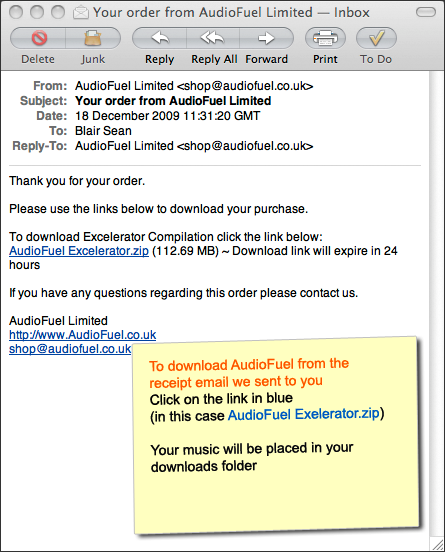
Click on the download link(s) on either the AudioFuel Downloads page or in the email we just sent to you. (example below shows email)
Click on the download link(s) on either the AudioFuel Downloads page or in the email we just sent to you. (example below shows email)
2. To add your AudioFuel to iTunes.
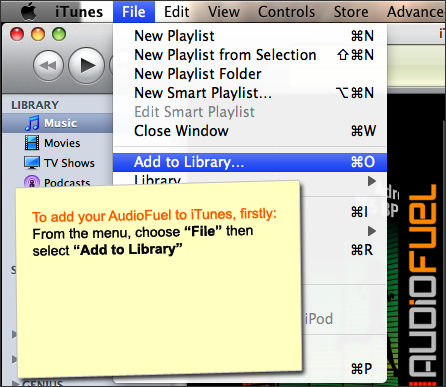
After the download is complete, add your music to iTunes like this:
After the download is complete, add your music to iTunes like this:
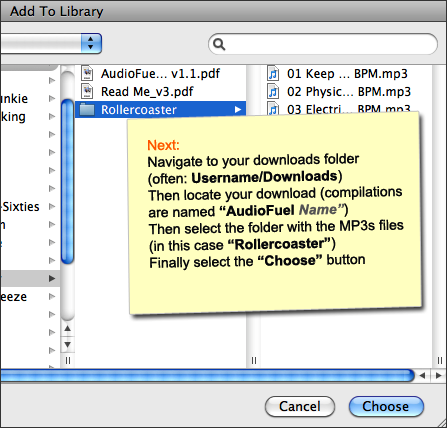
... next
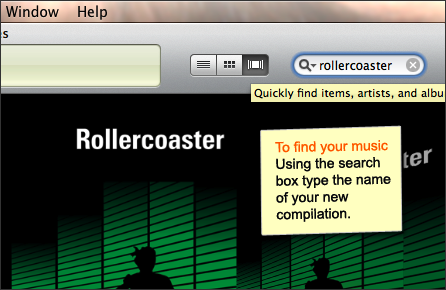
You should then find your music in your iTunes Library
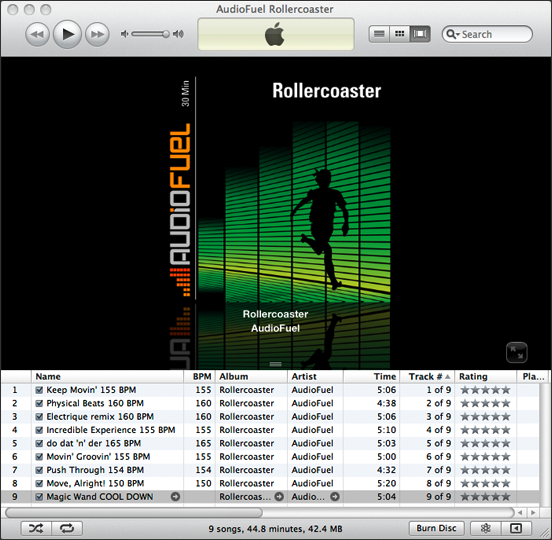
Finding your music in iTunes